 Serial communication with any pin, BitBanging Serial communication with any pin, BitBanging
 ATmega328P.pdf ( Register summary on p 428 )
The built in USART with its buffer registers is highly effective at serial communication. A disadvantage of the processor ATmega328/P is that it only has one such USART, sometimes you would need more, furthermore some smaller AVR processors lacks an integrated USART.
If you do not have so high demands on the serial communication (high baud rate, full-duplex) one can very well programany pin to bit by bit perform the serial communication. This is called BitBanging.
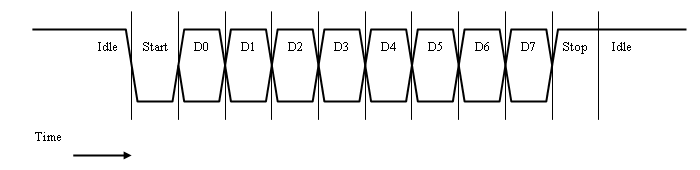
Timing diagrams for serial transmitting / receiving a character.
Funktions getchar_BB() and putchar_BB() for BitBang corresponds to the funktions getchar_uart() and putchar_uart() for USART.
Sometimes you want the processor to "echo" all characters received so the user can see what is written. A program with BitBang routines can either recieve a character or transmitt asend a character, so no characters can be received while the program is transmitting. This is called half-duplex. If you enter letters by hand the time between the characters is long enough for the processor to have enough time to both receive the characters and echoing them, but if an entire string is sent from the terminal then characters will be "missed". On a Windows computer, each press on the enter key means that two characters are sent (Ie, actually a string is sent "\r\n"), and in that case one can miss the last character when echoing the first.
Arduino terminal window has an input buffer where you write (and maybe edit) the string you are sending.
Because you see what you write in the input buffer, you does not need the processor to echo back the characters.
In the Arduino environment it will be natural to communicate with the whole strings.
The input buffer in the terminal window can also reduce the need of having to program the
corresponding input and editing features in the Arduino processor.

A typical use for BitBang routines is to wait for and receive a string, and then send a response string. This is basically what the example program below does.
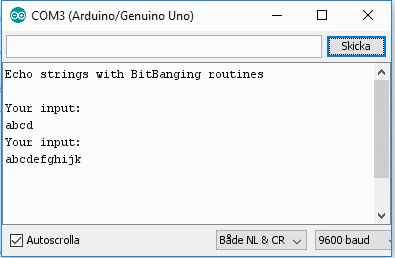
 Program bb_serial
use the same pins as the USART PD0 and PD1 - since
the Arduino terminal program is already connected to these pins.
Program bb_serial
use the same pins as the USART PD0 and PD1 - since
the Arduino terminal program is already connected to these pins.
Note. The pins are controlled by BitBang routines - so the USART is never switched on.
In the program the transmitter pin is called TX_BBpin and reciever pin is called RX_BBpin. In the beginning of the code we define the name of pins and registers and then we only need to do changes in this place if we want to change to other pins for the serial communication.
/* Redefine if you want to BitBang with other pins! */
#define RX_BBpin PD0
#define RX_DDR DDRD
#define RX_PORT PORTD
#define RX_PIN PIND

#define TX_BBpin PD1
#define TX_DDR DDRD
#define TX_PORT PORTD
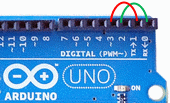
When switching pins you can still try the program with the Arduino terminal window.
The new pins are in this case connected in parallel with PD0 and PD1
with two wires.
The direction register DDRD shall now use both pins
PD0 and PD1 as inputs
(this is the register default value - nothing has to be done).
#define RX_BBpin PD2
#define RX_DDR DDRD
#define RX_PORT PORTD
#define RX_PIN PIND

#define TX_BBpin PD3
#define TX_DDR DDRD
#define TX_PORT PORTD
The full program is available here:
 bb_serial.txt
(for Arduino use code stored as: bb_serial\bb_serial.ino)
bb_serial.txt
(for Arduino use code stored as: bb_serial\bb_serial.ino)
William Sandqvist willsandqvist@gmail.com