 I2C-unit - Chime I2C-unit - Chime
 ATmega328P.pdf ( Register summary on p 428 )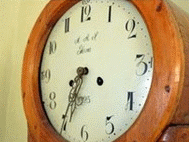
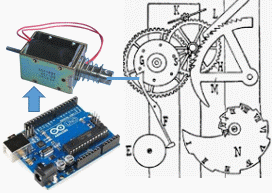
Assume that the hour of your antique clock has "given up" and that the mechanism seems impossible to repair!
This can give us an excuse to study the AVR processors' I2C device (TWI Two Wire Interface) which can be used for many different peripheral circuits, including RTC modules (Real Time Clock).
RTC modules are used to keep track of the date and time. All this can of course be programmed with ordinary microprocessors, but it can then be difficult to achieve as low power consumption as with a dedicated RTC circuit. With battery backup, such a circuit can provide the correct time for many years, even if there were long interruptions in the power supply.
DS1307 Tiny RTC, with rechargeable battery LIR2450
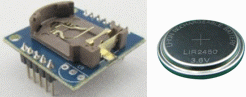
This simple example does not make use of the RTC module's year and date, but we read the time (hours and minutes) to let the AVR processor draw an electromagnet (traction magnet) that can beat the clock's hours.
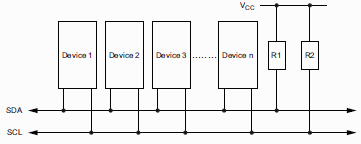
I2C ("Inter-Integrated Circuit") is a two-wire serial communication connection between circuits. There can be many different circuits connected at the same time, and they are separated by having different "addresses". The device that controls the communication is called the Master and other devices that are controlled are called Slaves, in principle any device can be the Master. We will limit ourselves to using only the AVR processor as Master, and the RTC circuit can only be Slave.
The figure shows that the two wires must be connected to the supply voltage with pullup resistors (10 kOhm). Those resistors are mounted on the RTC circuit board, but if you build your own circuit, you must make sure to include these.
The two I2C lines are called SCL (clock) and SDA (data) and it is the Master who is responsible for generating the clock pulses. Two unique combinations of SCL and SDA define "start" and "stop" respectively for the data transfer.
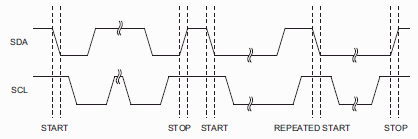
The AVR processor has a built-in device for I2C communication called TWI TWI (Two Wire Interface), which can generate the start condition and the stop condition as well as control the data transfer of bytes (8 bits) at a time.
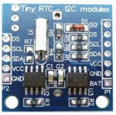

The RTC circuit DS1307 has the I2C write address 0xD0 and the I2C read address 0xD1.
It has 8 internal Byte registers that contain time and date packed as BCD numbers,
and a few individual bit's that control the working modes of the chip.
 RTC DS1307 registers
 0x00: "Seconds register" Format: "stop/!run sss ssss"      00-59
 0x01: "Minutes register" Format: "0 mmm mmmm"              00-59
 0x02: "Hours register"   Format: "0 12/!24 !a/p h hhhh"    00-12 a-p ; 00-23
 0x03: "Day register"     Format: "0000 0 ddd"              1-7
 0x04: "Date register"    Format: "00 DD DDDD"              01-28/29/30/31
 0x05: "Month register"   Format: "000 M MMMM"              01-12
 0x06: "Year register"    Format: "yyyy yyyy"               00-99
 0x07: "Control register" Format: "OUT 00 SQWE 00 RS1 RS2"  1, 4096, 8192, 32768 Hz
The eighth bit of the second's register will stop the clock if at "1" so it must always be set to "0".
The seventh bit in the hour's register determines whether this is a 12-hour or 24-hour clock.
If it is a 12-hour clock, the sixth bit is used to distinguish between "at morning" or "past morning".
In all registers, the time is stored as BCD digits (0-9). You can instead write hexadecimal numbers in the program because the characters that differ (A-F) will never appear!
If you need to convert a BCD number in a register to a regular binary number, you can do the following: bin = (bcd & 0xF) + 10*( bcd >> 4);.
The AVR processor's TWI unit is controlled by the registers TWDR, TWBR, TWAR, TWSR, TWCR. You need to write start, stop and bytetransfer functions that use these registers.
The TWI unit is Master and it must therefore generate the clock pulses. The RTC circuit we use can operate at a maximum of 100 kHz so this may determine the clock frequency. The registers TWSR and TWBR set the clock frequency according to the equation:

 //set SCL frequency to < 100kHz the max freq of DS1307
 //  Bits in TWSR register: "TWS7 TWS6 TWS5 TWS4 TWS3 - TWPS1 TWPS0"
 TWSR = 0x00;  // "xxxxx-00" prescaler set to divide by one

 //  TWBR register: frequency division byte
 TWBR = 73;  // SCLfreq = CPUfreq / (16+2*TWBR*Presc) = 16*10^6 / (16+2*73*1) = 99 kHz

 //enable TWI
 //  Bits in TWCR register: "TWINT TWEA TWSTA TWSTO TWWC TWEN - TWIE"
 TWCR = (1 << TWEN);  // "-----1--"
To generate the start combination, the bit TWSTA needs to be set,
together with the bits TWEN and TWINT (in the TWCR register).
You then need to wait for the start process to be completed ( TWINT ) before proceeding.
  //  Bits in TWCR register: "TWINT TWEA TWSTA TWSTO TWWC TWEN - TWIE"
  TWCR = (1 << TWINT)|(1 << TWSTA)|(1 << TWEN);  // "1-1--1--"
  while ((TWCR & (1 << TWINT)) == 0);            // "?-------" wait for done
To generate the stop combination, the bit TWSTO needs to be set, together with the bits TWEN och TWINT (in the TWCR register).
  //  Bits in TWCR register: "TWINT TWEA TWSTA TWSTO TWWC TWEN - TWIE"
  TWCR = (1 << TWINT)|(1 << TWSTO)|(1 << TWEN);  // "1--1-1--"
To write data oraddresses to the slave, it is placed in the TWDR register.
Then the bits TWEN and TWINT are set (in the TWCR register).
You then need to wait out the writing process ( TWINT ).
Slave will "acknowledge" the received character by sending an ACK bit ("1"). (You can check if this happens with the I2C_GetStatus() function, but this is not needed if everything works.
  TWDR = data;
  //  Bits in TWCR register: "TWINT TWEA TWSTA TWSTO TWWC TWEN - TWIE"
  TWCR = (1 << TWINT)|(1 << TWEN);             // "1----1--"
  while ((TWCR & (1 << TWINT)) == 0);          // "?-------" wait for done
Transfer of data from Slave to Master takes place byte by byte.
If you want to read several bytes in a row,
use the function I2C_ReadACK().
It ends the reading by sending out an ACK bit ("1").
You need to wait out the entire reading process ( TWINT ).
  //  Bits in TWCR register: "TWINT TWEA TWSTA TWSTO TWWC TWEN - TWIE"
  // with ACK set
  TWCR = (1 << TWINT)|(1 << TWEN)|(1 << TWEA);  // "11---1--"
  while ((TWCR & (1 << TWINT)) == 0);           // "?-------" wait for done
  return TWDR;
If you only want to read a single byte from a Slave, or in the case it's the last desired byte,
use the function I2C_ReadNACK().
Instead, it ends the reading by sending out a NACK bit ("0").
You need to wait out the entire reading process ( TWINT ).
  //  Bits in TWCR register: "TWINT TWEA TWSTA TWSTO TWWC TWEN - TWIE"
  // no acknowledge bit set, NOT ACK
  TWCR = (1 << TWINT)|(1 << TWEN);           // "1----1--"
  while ((TWCR & (1 << TWINT)) == 0);        // "?-------" wait for done
  return TWDR;
During testing of the equipment and during debugging of program code, a function I2C_GetStatus() is useful. It reports status codes from the TWI device.
  //  Bits in TWSR register: "TWS7 TWS6 TWS5 TWS4 TWS3 - TWPS1 TWSP0"
  Status = TWSR & 0xF8; // "-----000"  mask status
  return Status; // TWI masked status code for debug
As a troubleshooting tool, we have made a function printf_byte_uart() that is similar to printf(), but much smaller and simplified. It can print caption texts, and byte variables as decimal (%u, %d), hexadecimal (%x), binary (%b) numbers, or as letters (%c).
The most important thing is to write to the second's register (register 0). The constant SECONDS is specified in the program as a hexadecimal number to be able to fit directly as a BCD number. The 8th bit of the secondary register is a start/stop bit for the clock and it must be set to "0". When the rtc circuit is delivered, that bit can happen to have any value.
  /* Set RTC "Seconds register", (0x01) with "stop/!run" bit */
  /* Format:  "stop/!run sss ssss"  00-59                    */
  I2C_Start();
  I2C_Write( RTC_WR_ADDRESS);
  I2C_Write( 0x00 ); // address pointer for "Seconds register" with stop/!run bit
  I2C_Write( SECONDS & 0x7F );    // mask seconds, and force !run/stop to run (run = 0)
  I2C_Stop();
In a similar way, you then set the minute's register and the hour's register - see the program code.
You cannot have a program that resets the clock with the same constant time each time the program starts. The RTC_setup.c program should be run once, then you remove the RTC module and let it run by itself with the backup battery.
 RTC_setup.txt
(for Arduino store code as: RTC_setup\RTC_setup.ino)
RTC_setup.txt
(for Arduino store code as: RTC_setup\RTC_setup.ino)We need to read hours and minutes. When reading, first write the write address of the device, then write the register address (1 for the minute's register). Then you restart and write the device read address. Since we only read one byte, we then use the function I2C_ReadNACK().
  /* Read minutes register */
  I2C_Start();
  I2C_Write( RTC_WR_ADDRESS);
  I2C_Write( 0x01 );    // dummy write "Minutes register" to set address pointer
  I2C_Start();          // repeat start
  I2C_Write( RTC_RD_ADDRESS);
  mn = (I2C_ReadNACK()) & 0x7F;  // the last and only data byte to read (NACK)
  I2C_Stop();
Hours are read in a similar way - see the program code.
The program retrieves the time from the RTC every second.
If the minutes were "59" last time we retrieved the time, and the minutes now are "00", then the clock should strike "hours" number of beats.
RTC_bell.txt
(for Arduino store code as: RTC_bell\RTC_bell.ino)
William Sandqvist willsandqvist@gmail.com