 Press the button - light up the LED Press the button - light up the LED
 ATmega328P.pdf ( Register summary on p 428 )
 |
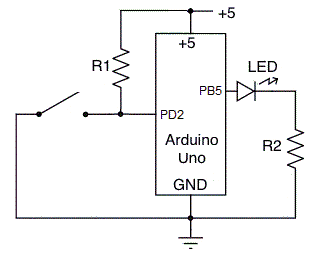 |
To light an LED with a switch of course requires no microprocessor, but it is a good idea to become familiar with a processor by starting with elementary examples.
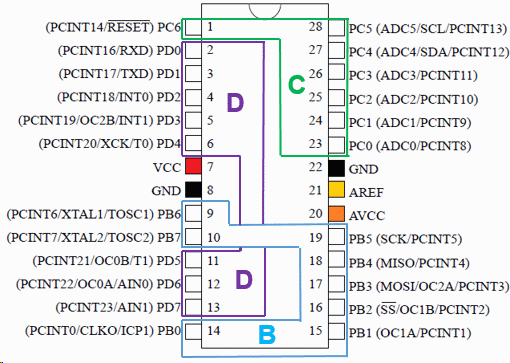
Port pins are controlled by three registers for each port. Each bit of the registers control the corresponding pin.
The program uses PD2 as input from Button, and PB5 as output to the inbuilt LED. By activating the PD2 internal pullup resistor one can exclude R1.
DDRD  &= ~( 1 << PD2 );      // PD2 '0' direction is input
PORTD |=  ( 1 << PD2 );      // '1' activate button pullup resistor
DDRB  |=  ( 1 << PB5 );      // PB5 '1' LED is output
To light '1' LED on Button pressed '0', write like this:
if( ( PIND & ( 1 << PD2 ))==0 )  PORTB |= ( 1 << PB5 ); // Button pressed '0' LED "1" on
else   PORTB &= ~( 1 << PB5 );                          // LED '0' off
The full program is available here:
 button.txt
(for Arduino use code stored as: button\button.ino)
button.txt
(for Arduino use code stored as: button\button.ino)
William Sandqvist willsandqvist@gmail.com