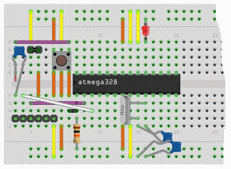
 The ATmega processor on breadboard The ATmega processor on breadboard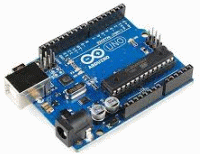

 ArduinoOnBreadboard.fzz
with the testprogram
ArduinoOnBreadboard.fzz
with the testprogram  blink_C.txt
(for Arduino use code stored as: blink_C\blink_C.ino)


Start by acquire an Arduino UNO R3 and a breadboard (in Sweden eg. electro:kit art.nr. 10160840). This is sufficient to carry out most experiments with sensors and motors.
Would you then like have the processor ATmega328/P on a bresdboard, this can be done in several ways. You can move the processor from the Arduino board to the breadboard. One can buy a processor that is pre-programmed with the Arduino bootloader program (in Sweden electro:kit art.nr. 41010636). The cheapest is to buy an "empty" processor (in Sweden electro:kit art.nr. 41010051) and use Arduino card as chip-programmer to upload the boot loader program into the processor chip.
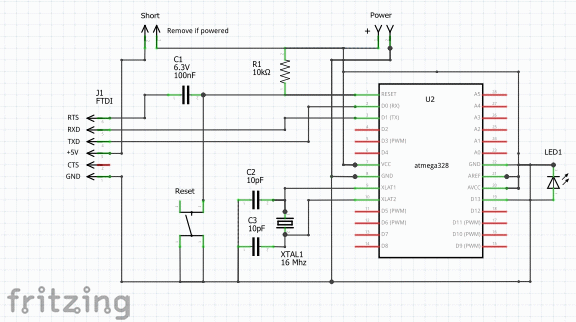
On the breadboard a 16 MHz crystal (in Sweden electro:kit art.nr. 41002380), and 22 pF ceramic capacitors, one plastic capacitor 100 nF, one resistor 10 kΩ, and one reset-switch (in Sweden electro:kit art.nr. 41001412).
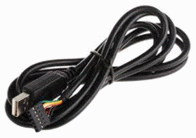
For serial communication/circuit programming one FTDI cable USB-TTL-5V is needed (in Sweden electro:kit art.nr. 41004213) and a pin header (in Sweden electro:kit art.nr. 41001167) to connect it to the breadboard.
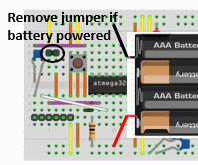
While developing and testing the code, it is convenient to supply the breadboard with USB voltage from the serial communication. For a product, it is natural to take the voltage from any other source (eg. a battery).
If you connect a 6V battery to the breadboard, you must remove the power supply from the USB connector, you can only use one voltage source at the time with this simple breadboard setup.

If you need to replace the power supply often it isgood to have a pin header with two pins and a shorting plug on the breadboard. Remove the short-circuit plug when using the battery. (It is of course equally well to directly make reconnections on the breadboard).
When working with breadboard, it is very convenient to use LEDs with built-in series resistors (otherwise you have to use a 330 Ω resistor to each LED you use - this will take place!).
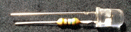
These are available from ELFA, or (Sweden) Kjell&Co (90-625).

LED with series resistor 5V green ELFA 75-014-99
LED with series resistor 5V red  ELFA 75-012-59
LED with series resistor 5V yellow  ELFA 75-015-11
A link to a very clear YouTube-video description of an other breadboard with Arduino.
Julian Ilett - Arduino on breadboard
William Sandqvist willsandqvist@gmail.com