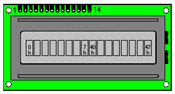
When it comes to small AVR processors there are few pins, and you dont want to connect an LCD display with many lines.
All LCD displays has a feature that allows characters and commands to be loaded as 2 x 4-bit numbers (nibble) in
succession, instead of using an 8-bit number (byte). In this case, it is sufficient to connect the four data lines
and two control lines (if one refrains from being able to read the LCD registers, with RD/!WR).
The command to set 8 or 4 data lines to be used must be given first.
This command has obviously been chosen so that 4 bits are sufficient to distinguish it from the other commands!
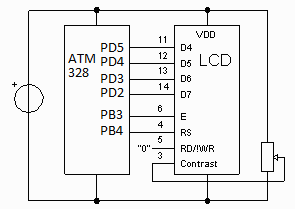
Breadboard one line 8+8
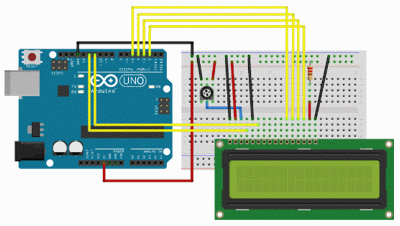
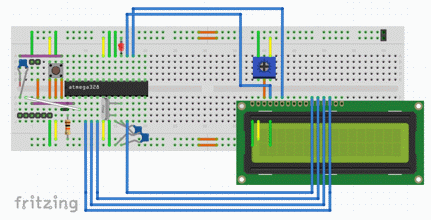
Fritzing
 LCD8-8.fzz
Program example with 8+8 characters on same line.
The equipment is from start programmed with LCD8-8_C.c
which writes "Hello world" on the display. (as "Hello wo" + "rld! " )
 LCD8-8_C.txt
(for Arduino use code stored as: LCD8-8_C\LCD8-8_C.ino)
LCD8-8_C.txt
(for Arduino use code stored as: LCD8-8_C\LCD8-8_C.ino)
User-defined characters?
You can load the pixel definitions of up to 8 user-defined characters.
The characters are then "ASCII-codes" 0 ... 7.
(Note that C uses 0 as the end of line character so it could be wise to not use this position).
For us in Sweden it is natural to use six of the self-defined characters for å ä ö Å Ä Ö,
that leaves two characters for your own symbols.
A sample program (for 8+8) with user-defined characters are
 udcLCD8-8_C.c.
After studying the example program udcLCD8-8_C.c
You can probably figure out how to compose your own characters ...
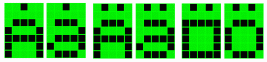
( See Mark Owen's page on user defined characters )
Breadboard 2x16
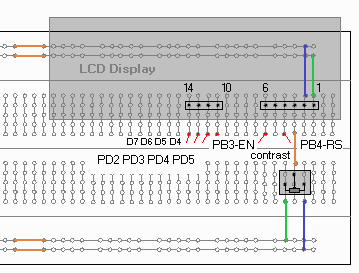
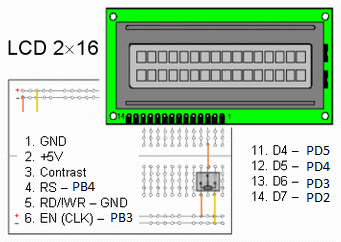
LCD-displays comes in many different designs.
There are displays with different number of lines and different many characters per row.
The rows then have different start addresses in the LCD chip buffer memory.
There are two different contact types and also different location of the contacts.
If the display has backlight, this is connected to the supply voltage + 5V (pin 15) and ground,
gnd (pin16) with a current-limiting resistor in series (220 Ohm).
- Program for display with two 16 charcter lines.
- "Hello World! "
- "Hello Kitty! "
- LCD2x16_C.txt
( for Arduino use code stored as: LCD2x16_C\LCD2x16_C.ino )
Back to start page
William Sandqvist
william@kth.se
 LCD ASCII character displays
 ATmega328P.pdf ( Register summary on p 428 )