 Password control Password control
 ATmega328P.pdf ( Register summary on p 428 )
ANSI C has many functions for string manipulation. For small processors this may be too complex and extensive features. The generated code can also be unnecessarily large. An alternative is to write your own custom functions. Then you also know better how they work in detail.
Often you need a simple function to enter a string into a buffer,
and complete the entry with the Return key.
Return key has different functions in different operating systems.
In Windows generates the Return key two characters in succession,
"\r\n". Linux uses '\n', Mac uses '\r'.
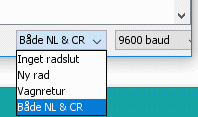
Arduino terminal window allows different settings. The input function below is written for Windows.
It fills a buffer with the input characters and ends with the string end character '\0' when
pressing the return key.
At (MAX_STRING-1) characters it will stop counting up the buffer to prevent overflow.
Instead of the function echoing the input characters one can echo putchar_uart('*')
when it is about inputing a password.
The function is blocking until it has recieved the correct return character.
void string_in_uart( char * string ) //  Expects '\r' + '\n' to end input. Windows style.
{
   unsigned char charCount, c;
   for( charCount = 0; ; charCount++ )
       {
         c = getchar_uart( );       /* input 1 character     */
         string[charCount] = c;     /* store the character   */
         putchar_uart( c );         /* echo the character    */
         if(c=='\r' ) charCount-- ; /* skip and wait for '\n' to end input */
         if( c=='\n'){ string[charCount] = '\0'; return; } /* end of string and end of input */
         if( charCount == (MAX_STRING-1)) charCount-- ;    /* prevent buffer overflow        */
       }
}
Next is to compare the input string with various stored string constants. One passes the Buffer and the string constant starting addresses to a function check_password() which returns "1" when hit, and "0" otherwise.
unsigned char check_password( char * input_string, const char * candidate_string )
{
   unsigned char i;
   for(i=0; ; i++)
     {
       if(candidate_string[i] != input_string[i] ) return 0;  /* no match - give up */
       if( candidate_string[i] == '\0' )           return 1;  /* exact match up to length of candidate */
     }
}

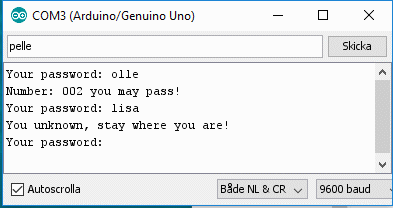
 password.txt
(for Arduino use code stored as: password\password.ino)
password.txt
(for Arduino use code stored as: password\password.ino)When starting the program string constants are normally copied to RAM, the GPU registers,
to be accessible by indexing or with pointers. RAM is small.
If you need to store a lot of data in the form of string constants in the program,
then you want instead to reach them directly from the program memory.
Then you need to use macros from the include file pgmspace.h.
The program version password_P is written with the use of these macros.
password_P.txt
(for Arduino use code stored as: password_P\password_P.ino)
William Sandqvist william@kth.se