 Program Arduino with C Program Arduino with C
 Arduino_C.zip (All Arduino C-code examples)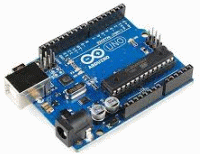
Arduino UNO3 is an open-source electronics platform based on easy to use hardware and software. You "tell" the Arduinon what to do by sending a set of simple instructions to the processor on the circuit board.

Arduino is often used in various art projects - here with circuit boards made with the program Fritzing.
The programming of the Arduino is done with a flexible software, and a simple language, "Processing", that originally was developed to teach programming in the context of different art project ("Visual Arts").
To the Arduino card there is a free IDE (Integrated Development Environment), for the operating systems Windows, MAC, and Linux.

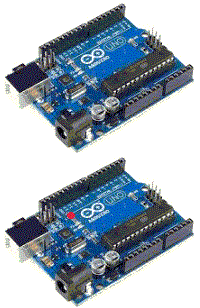
This is how easy you make an Arduino program that flashes the LED that is built on the PCB. (Only five simple lines of code!)
void setup() {
  pinMode(LED_BUILTIN, OUTPUT);
}

void loop() {
  digitalWrite(LED_BUILTIN, HIGH);   // turn the LED on (HIGH is the voltage level)
  delay(1000);                       // wait for a second
  digitalWrite(LED_BUILTIN, LOW);    // turn the LED off by making the voltage LOW
  delay(1000);                       // wait for a second
}
The Arduino environment is very useful when you want to quickly try out different ideas to show others, and when the requirements for an economic solution are not so high.
Arduino simplicity, however, comes with a cost.
The generated code can be unnecessarily large and inefficient.
The simple Arduino code hides what is actually performed,
and this makes it difficult to find errors in programs.
When things does not work as intended,
the detailed knowledge of the processor and its programming is what's required.
Anyone who studies a programming education therefore need to learn to program the processor directly -
for example, with the programming language C.
This is required in order to be able to find programming errors,
and to create an efficient program code.
 ATmega328P.pdf ( Register summary on p 428 )
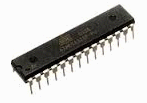
Arduino UNO 3 is build around the microcontroller chip ATmega328/P from Atmel (Microchip). It is described in detail in its data sheet ATmega328P.zip.
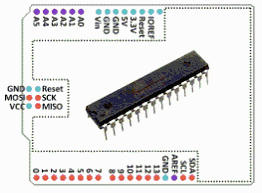
Most of ATmega chip pins are directly connected to Arduino card contacts. It is therefore easy to connect external components to the UNO 3 card. There are also plenty of comercial circuit boards (called Shields) with additional equipment to connect directly to the UNO 3 card contacts.
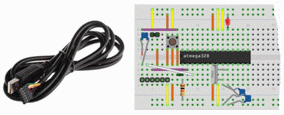
Anyone who wants can instead of using an Arduino circuit board, place the processor ATmega328P directly on a breadboard. There are many descriptions on the web about how to do this and what other components are needed.
Here is a Breadboard copy of Arduino, documented with the program Fritzing: Arduino UNO 3.
 |
 |
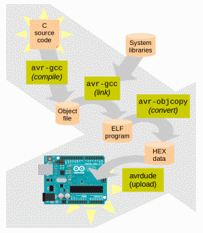
To program the AVR processors efficiently with the programming language C You can use a complete environment with a GCC compiler

The Arduino IDE is actually built around exactly the same C-environment as that you download, as "Atmel AVR Tool Chain". If you have an Arduino, you can simply write pure C code directly in the Arduino text editor Arduino, and avoid all Arduino specific commands (do not use the "Processing Functions").
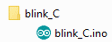
(One difference from a pure C environment is that the source code files in an Arduino environment gets the file name extension *.ino and that they end up inside folders with the same name as the file name.)
Useful HINT! Arduino text editor displays the line number in the lower left corner for the line the cursor is on. This needs to be known when the compiler report errors on specific lines!
You start by placing the circuit documentation directly in the source file!
Then it will be easy to find your way among the pins.
Copy the ASCII graphics showing the ATmega processor's pin placement and
the connections to the Arduino connectors (stackable header).
Then update the graphics every time you do a change - or plugs something in!
/* *********************************** */
/*            HARDWARE                 */
/* *********************************** */

/*                   Chip ATMega328                          Arduino Uno R3 stackable header
                                                                            _______
                                                            Digital:  _____/       \__  Analog:
             ______________  ______________                         -|D00 >RXD      A5|-
            |              \/              |                        -|D01 <TXD      A4|-
      Res---|01 PC6/RES' ATM328  SCL/PC5 28|-(A5)-                  -|D02           A3|-
     -(D00)-|02 PD0/RXD          SDA/PC4 27|-(A4)-                  -|D03~          A2|-
     -(D01)-|03 PD1/TXD              PC3 26|-(A3)-                  -|D04           A1|-
     -(D02)-|04 PD2/INT0             PC2 25|-(A2)-                  -|D05~          A0|-
     -(D03)-|05 PD3/INT1/PWM         PC1 24|-(A1)-                  -|D06~            | Power:
     -(D04)-|06 PD4                  PC0 23|-(A0)-                  -|D07          Vin|-
     +5V ---|07 VCC                  GND 22|--- Gnd                  |             GND|-
     Gnd ---|08 GND                 AREF 21|--- Vin                 -|D08          GND|-
  Xtal |X|--|09 PB6/OSC1            AVCC 20|--- +5V                 -|D09~         +5V|-
 16MHz |X|--|10 PB7/OSC2         SCK/PB5 19|-(D13)-                 -|D10~       +3.3V|-
     -(D05)-|11 PD5/PWM         MISO/PB4 18|-(D12)-                 -|D11~         Res|-
     -(D06)-|12 PD6/PWM     PWM/MOSI/PB3 17|-(D11)-                 -|D12        IOREF|-
     -(D07)-|13 PD7          PWM/SS'/PB2 16|-(D10)-                 -|D13 LED     --- |
     -(D08)-|14 PB0              PWM/PB1 15|-(D09)-                 -|GND             |
            |______________________________|                        -|AREF            |
                                                                    -|SCL             |
                                                                    -|SDA             |
                                                                     |________________|
*/
ATmega328 has 28 pins. They are divided into three ports with registers PORTB and PORTC and PORTD. For each register is also a direction register, Data Direction Register DDRB DDRC DDRD. The Bit positions in direction registers tat are '1' makes the corresponding pin an output, otherwise it remains (as default) an input.
To use the name of bits and registers present in the data sheet, you need to include the file:
#include <avr/io.h>
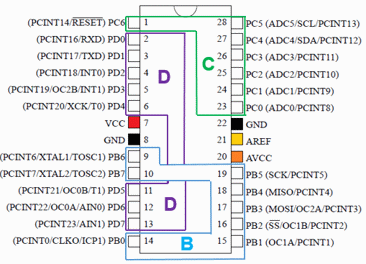
ATmega328 processor ports B C D.
To flash the LED on Arduino card, which is connected to pin 19 (PB5, PORTB bit 5),
it's pin must be set as output.
DDRB bit 5 should be '1'.
You can write DDRB = 0b01000000; but then we simultaneously affect the direction of all other pins on the port.
Better to write DDRB |= ( 1 << 5 ); which means that we masks (or) with a bit mask
with bit number 5 set. Other bits are not affected of this.
Still better is to write DDRB |= ( 1 << PB5 );
here we make use of that the include file contains information about which bit number thats corresponds to the bit name!
In order to "lit" the LED must PORTB bit 5 to be '1' PORTB |= ( 1 << PB5 );.
Then to "put out" the LED one masks (and) with a bit mask with all bits '1' exept bit 5 that is '0'. PORTB &= ~( 1 << PB5 );.
One can also "toggle" ('1' and '0' alternately) a port pin by masking (xor). PORTB ^= ( 1 << PB5 );.
To wait, you can let the processor execute a long meaningless calculation.
void wait(void)
{
   long unsigned int local_delay;
   for (local_delay = 0; local_delay < 400000; local_delay++ ) /* empty loop */ ;
}
ATmega is a 8-bit processor.
A for-loop with a long loop counter variable is sufficient for a very large time intervals. With a starting value of 40000 the time will be of the order of seconds ( at our clock frequency 16 MHz ).
BUT UNFORTUNATELY! it turns out that this counting loop does not work !?
The problem is that the compiler detects that the loop does nothing, that it is meaningless, so it optimizes and simply removes the code! So how do you tell the compiler that you are serious and want to keep the code?
volatile long unsigned int local_delay;
The keyword volatile means that the variable may change outside the control of the compiler and therefore can not be optimized away. Now the code works!
 blink_C.txt
(for Arduino use code stored as: blink_C\blink_C.ino)
blink_C.txt
(for Arduino use code stored as: blink_C\blink_C.ino)
Redymade comfortable delay-loops. The used parameter is the number of ms or us given as a float constant.
The compiler calculates the required number of turns in the loop with a macro,
and then uses a basic delay loop for the delay.
(It is important that parameter is a constant and not a variable.
If the parameter is a variable, the number of turns in the delay loop can not be calculated in advance during compilation,
but must be calculated by the processor - the compiler must then include the huge floating point library just for this!)
In order to calculate the correct times, the compiler must know what clock speed processor works with. In the Arduino environment this is determined by the type of Arduino chosen, but the information can also be written in the code #define F_CPU 16000000UL.
#define F_CPU 16000000UL
#include <util/delay.h>
void _delay_ms (double);
void _delay_us (double);
William Sandqvist willsandqvist@gmail.com