 I2C BitBanging I2C BitBanging
 ATmega328P.pdf ( Register summary on p 428 )
A microprocessor generally does not need to have more than one I2C (TWI) unit. This is enough to connect up to a hundred I2C devices! However, there are simpler (cheaper) microprocessors that do not have an I2C unit at all. Then you may need to program the I2C data transfer bit by bit, so-called BitBanging.
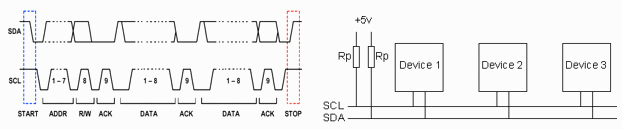
The I2C bus is based on the logic levels "1" and "0" being differently strong,
where "0" is the dominant level.
It is sufficient that the output of any device along the bus is "0" for that value to apply.
The outputs of the AVR processors, on the other hand, are equally strong for "1" as for "0".
(The exception is the TWI pins on processors that have a TWI unit).
To use ordinary pin/output as I2C pin, you therefore need to use a trick.
You start by storing "0" for the pin in the PORT register.
If you then select "1" (= output) for the pin in the DDR register,
the pin becomes a strong "0". If you instead select "0" (= input) in the DDR register,
the pin will be "disconnected" as output.
Then the PullUp resistor on the bus line counts as a weak "1".
You thus control the I2C levels with the DDR register and do not touch the PORT register.
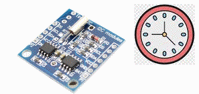
As an example, we use the RTC circuit DS1307,
and we choose to control it with pins PB0 (SCL) and PB1
(SDA).
The PullUp resistors are already on the RTC module circuit board.
(The functions are programmed to follow the time diagram in the figure above.
We have not done any time optimization and are satisfied with a moderate transfer speed,
so we do not need to implement any "clock stretching".)
/* I2C pin connections               */
/* Redefine if other pins are used   */
 #define SCL_BBpin PB0
 #define SCL_DDR   DDRB
 #define SCL_PORT  PORTB
 #define SCL_PIN   PINB

 #define SDA_BBpin PB1
 #define SDA_DDR   DDRB
 #define SDA_PORT  PORTB
 #define SDA_PIN   PINB
 SDA_PORT  &= (~( 1 << SDA_BBpin ));  // port = 0
 SCL_PORT  &= (~( 1 << SCL_BBpin ));  // port = 0
 SDA_DDR   &=( ~( 1 << SDA_BBpin ));  // direction 0 = input,  pull-up 1 -> SDA high
 SCL_DDR   &= (~( 1 << SCL_BBpin ));  // direction 0 = input,  pull-up 1 -> SCL high
 SDA_DDR   &= (~( 1 << SDA_BBpin ));  // direction 0 = input,  pull-up 1 -> SDA high
 SCL_DDR   &= (~( 1 << SCL_BBpin ));  // direction 0 = input,  pull-up 1 -> SCL high
 _delay_us (10);  // slow I2C clock

 SDA_DDR  |=  ( 1 << SDA_BBpin );  // direction 1 = output, port = 0 -> SDA low
 _delay_us (10);

 SCL_DDR  |=  ( 1 << SCL_BBpin );  // direction 1 = output, port = 0 -> SCL low
 _delay_us (10);
 SDA_DDR  |=  ( 1 << SDA_BBpin );  // direction 1 = output, port = 0 -> SDA low
 SCL_DDR  |=  ( 1 << SCL_BBpin );  // direction 1 = output, port = 0 -> SCL low
 _delay_us (10);

 SCL_DDR   &= (~( 1 << SCL_BBpin ));  // direction 0 = input,  pull-up 1 -> SCL high
 _delay_us (10);

 SDA_DDR   &= (~( 1 << SDA_BBpin ));  // direction 0 = input,  pull-up 1 -> SDA high
 _delay_us (10);
I2C_Write_BB( ). After writing 8 bits, you need to leave SDA "1" so that the "slave" with "0" (ACK) can acknowledge that the byte has been received. You can read this bit as debug information.
I2C_ReadACK_BB( ). After reading 8 bits, one byte, you can receive another byte in sequence. You must then write SDA "0" (ACK) as a ninth bit.
I2C_ReadNACK_BB( ). If you only want to read one byte, or in the case of the last byte in a sequence, you must write SDA "1" (NACK) as the ninth bit.
Compare with the same program example for the TWI-unit.
 RTC_setup_BB.txt
(for Arduino store code as: RTC_setup_BB\RTC_setup_BB.ino)
RTC_setup_BB.txt
(for Arduino store code as: RTC_setup_BB\RTC_setup_BB.ino)
William Sandqvist willsandqvist@gmail.com