 ATmega328P.pdf ( Register summary on p 428 ) ATmega328P.pdf ( Register summary on p 428 )
 SPI-unit - Barometer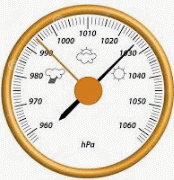
Imagine if you had your own barometer. Then you could make your own weather forecasts by reading the air pressure and see how it changes. The normal air pressure (at sea level) is 1013 hPa (hecto Pascal). Above 1020 hPa there is high pressure and below 1005 hPa there is low pressure. Expect rain if the air pressure drops by more than 3 hPa/hour.
The air pressure decreases with increasing height above sea level by 1 hPa/10 m (actually 1hPa/8m). A barometer can therefore also be used as an "altimeter".
Barometer data are usually recalculated to what would apply at sea level. Classic mechanical barometers usually have an adjusting screw on the back so that the barometer can be calibrated.
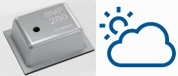
BOSCH BMP280 Digital Pressure Sensor is a pressure sensor with exceptional data. The resolution is 0.12 hPa corresponding to a height difference of 1m.
This high performance has been achieved in that each sensor has stored individual calibration constants, which the reading microprocessor uses in a compensation formula. The sensor has a built-in temperature sensor so the actual chip temperature is also used in the calculation of the pressure value.
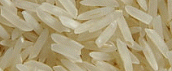
With a sensor that is smaller than a "rice grain",
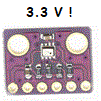
it is not surprising if hobbyists choose to buy a breakout board with the sensor soldered in place.
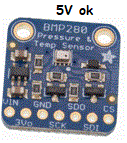
For use with Arduino UNO, you must then buy a card that has a built-in conversion from 5V to 3V logic level (eg Adafruit "BMP280 I2C or SPI Barometric Pressure & Altitude Sensor").
NOTE that the BMP280 does not withstand 5V logic levels!
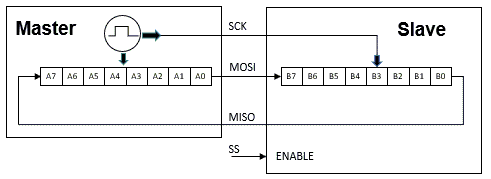
SPI, Serial Peripheral Interface, is a bus for synchronous serial communication between a master unit (Master) and a slave unit (Slave). The bus has four signals, SCLK Serial CLocK from Master, MOSI Master Out Slave In, MISO Master In Slave Out, and a SS (active low) Slave Select signal that activates the slave unit. It is possible to have several slave units connected at the same time, in which case each slave unit has its own SS signal. Only the slave unit to be activated is connected "electrically" to the bus (so-called tristate).
Master and Slave each consist of 8-bit shift registers that are connected so that data is shifted around (in a ring). After 8 clock pulses, all the data has changed location, it can be said that Master and Slave both send and receive data at the same time.
The master must be able to set a suitable clock frequency.
The clock pulses can further start from a sleep mode which is 0 or which is 1,
the shift registers can be clocked with rising or falling edges,
a total of four such "SPI-Mode" may need to be set.
The shift order can be from bit 7 to 0 or from bit 0 to 7. There is no formal standard for the SPI bus.
You simply have to read carefully in data sheets to see what format the Slave unit you want to use needs.
The ATmega328P processor on the Arduino card has a built-in SPI device. It is controlled from the SPCR spi-control register, and the SPSR spi-status register.
The SS pin is not controlled by the spi unit when it is used as a Master, but it must be handled in the program as a standard port pin. The BMP280 circuit requires that the SS is low at start-up - otherwise it is assumed that you want to use I2C for communication instead of SPI. The idle mode for SS is high, it should then be kept low during all communication.
As soon as the communication starts, the BMP280 detects which of the different SPI-Modes is being used, and then adapts to this!
The function: void SPI_init(); make the necessary settings of the SPI.
The functions: void SPI_masterTransmitByte(unsigned char data); and unsigned char SPI_masterReceive(); is used to send and receive data. They use the SPDR spi data registers and the SPSR spi status registers.
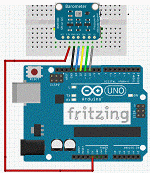
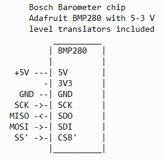
You connect the BMP280 card to + 5V and GND from Arduino. The card has its own + 3.3V voltage regulator and built-in conversion of the logic levels. The signals are connected as SCK(D13)-SCK, MISO(D12)-SDO, MOSI(D11)-SDI, SS(D10)-CSB.
A small program is needed that reads the BMP280 chip's ID register that contains the ID number. This number is "0x58". If you do not get that value when reading, you must conclude that you probably connected something wrong!
 BMP280_CQ.txt
(for Arduino store code as: BMP280_CQ\BMP280_CQ.ino)
BMP280_CQ.txt
(for Arduino store code as: BMP280_CQ\BMP280_CQ.ino)Each chip contains 12 individual calibration constants, 16 Bit Numbers (for Arduino "int"). They are stored as 8 bit numbers in 24 registers. These 24 registers must be read and then the 12 constants must be composed. The constants are needed to be able to calculate accurate measured values.
The program: BMP280_calibration.c prints these constants on Arduino's serial monitor in such a format that they can be directly copied and pasted into the program code for this particular specimen of the chip.
BMP280_calibration.txt
(for Arduino store code as: BMP280_calibration\BMP280_calibration.ino)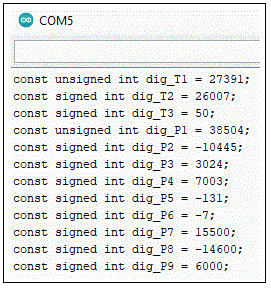
Nowhere in the circuit data sheet does it say what the different calibration constants mean or what their function is.
Instead, a complete compensation formula is given. Input to the formula,
as well as output, are 32-bit integer variables (for Arduino "long int"). Internally in the formula
64-bit integer variables are used for the multiplications (for Arduino "long long int").
The calculations use "fixed point" format Q24.8 (24 integer bits and 8 fraction bits).
This means that you do all calculations with integers, but that you "imagine" a binary point at 8 bits.
(Just like an economics program that counts the cents and then inserts a decimal point after two decimals to indicate the result in dollars).
This is to avoid having to bring the bulky code library for floating point numbers,
because the used processor is only 8 bits and it has limited memory.
The data sheet contains typical values for the constants, and what result you should get if you use the compensation formula with these values.
When writing a complicated formula from a data sheet, there is always a risk of misunderstanding, or for incorrect depreciation. This program: BMP280_calculations.c performs the calculations with the data sheet constants and, as it turns out, gives the right results.
BMP280_calculations.txt
(for Arduino store code as: BMP280_calculations\BMP280_calculations.ino)For a barometer, it is enough to make one measurement per minute. There is also no need to filter the measured value. The BMP280's power consumption will then be low, as will the self - heating of the sensor. It can then be assumed that the temperature values correspond to the ambient temperature.
BMP280 can also be used for other things, such as detecting a sharp drop in height during kite flying, or on which floor an elevator is on in a high-rise building. Then completely different settings of measurement interval and filtering of measurement data are required.
barometer.txt
(for Arduino store code as: barometer\barometer.ino)A barometer that is read once a minute (!) is not such a demanding task that it requires a dedicated SPI unit in the processor you use. It is of course possible to program the entire data transfer bit by bit, with BitBanging.
The program BMP280_CQ_BB.c corresponds to the previously presented program BMP280_CQ.c with the difference that the SPI functions are written without the use of the SPI device. The connections of the BMP280 sensor have been retained and are the same, but they can now be redefined to optional terminals on the processor if desired.
BMP280_CQ_BB.txt
(for Arduino store code as: BMP280_CQ_BB\BMP280_CQ_BB.ino)The programs BMP280_calibration_BB.c and barometer_BB.c corresponds to the previously presented programs BMP280_calibration.c and barometer.c with the same difference that the SPI functions are written without the use of the SPI device.
BMP280_calibration_BB.txt
(for Arduino store code as: BMP280_calibration_BB\BMP280_calibration_BB.ino)
barometer_BB.txt
(for Arduino store code as: barometer_BB\barometer_BB.ino)
Moore about I2C, TWI-unit (I2C-Bus).
The Bosch air pressure sensor BMP280 can alternatively communicate using the I2C bus. It is difficult to know why someone would choose the I2C bus before the SPI bus or vice versa, but freedom of choice is always good.
If CSB is connected to "1" then I2C is selected. On the Adafruit BMP280 breakout board, CSB is connected via a resistor to "1". (In our SPI examples, the programs have started by holding CSB at "0" so that the SPI mode has been selected by the sensor.)
At I2C, the sensor has two alternative device addresses, so two BMP280s can be connected to the same I2C bus without the risk of an address collision. The device address is set with SDO. On the Adafruit BMP280 breakout board, a pull-up resistor set SDO to "1" and then the 7-bit device address will be 0x77. If SDO is connected to GND the device address will be 0x76.
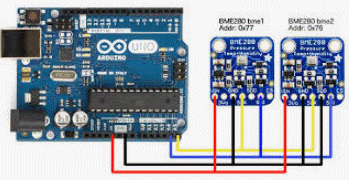
 // BMP280 7-bit device address is 0x77  (with SDO = 1 default by pullup)
 #define BMP280_WR_ADDRESS 0xEE // 8-bit write address
 #define BMP280_RD_ADDRESS 0xEF // 8-bit read address

 // BMP280 alternative 7-bit device address is 0x76 (with SDO = 0, GND)
 // #define BMP280_WR_ADDRESS 0xEC // 8-bit write address
 // #define BMP280_RD_ADDRESS 0xED // 8-bit read address
BMP280_CQ_I2C.txt
(for Arduino store code as: BMP280_CQ_I2C\BMP280_CQ_I2C.ino)
BMP280_calibration_I2C.txt
(for Arduino store code as: BMP280_calibration_I2C\BMP280_calibration_I2C.ino)
barometer_I2C.txt
(for Arduino store code as: barometer_I2C\barometer_I2C.ino)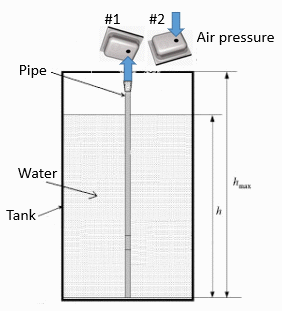
With two BMP280 you can make a differential measurement. For example, if you want to know the liquid level in a tank, you can measure the pressure at the bottom of the tank with a hose and a BMP280 (#1). This measurement will also include the air pressure at the liquid surface - but this can be deducted if you measure the air pressure with a second BMP280 (#2).
William Sandqvist willsandqvist@gmail.com