 NeoPixel - Clock - Face NeoPixel - Clock - Face
 ATmega328P.pdf
( Register summary on p 428 )
ATmega328P.pdf
( Register summary on p 428 )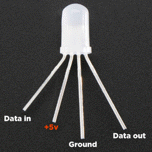
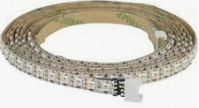
Addressable LEDs with three colors and variable brightness are the dream for all of us who loves flashing LEDs! They are available in many designs, as simple LEDs, as strips on rolls of 32 per meter, or as squares (matrices 16x16).
But if you want a lot of pixels and need a quick update, NeoPixels on an Arduino UNO will be a programming challenge (or even an impossibility). Unfortunately, there is no built-in "NeoPixel device" that could relieve the processor in a similar way as there are SPI, I2C, or UART devices.
Another microcontroller that better fits large NeoPixel arrays is the Raspberry Pico. It has two processor cores, a lot of memoy, and a programmable IO device. The IO device can be programmed to perform all NeoPixel bit timing and it can then handle the update of very large displays independently and directly from the microcontroller's memoy (with DMA).
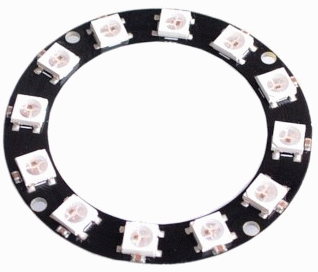
However, a ring with 12 NeoPixel that is updated at most per second is no problem for an Arduino UNO!
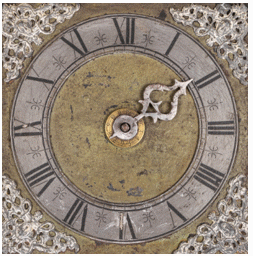
To try out the NeoPixel technology, a "dial" can serve as a suitable example. Exact time can be obtained wit a RTC module and this is presented in connection with the TWI unit, so we do not have to worry about that here.
Circle with 12 NeoPixel Adafruit 12x5050 RGB
NeoPixel are addressable LEDs with three colors. The strength of the three colors is set with three 8-bit numbers for green, red, and blue.
The communication takes place bit by bit over a wire, a "0" bit has a short pulse with a high level, and a "1" bit has a slightly longer pulse with a high leel. After a break with a low level, the next bit can folow. If the low-leel break instead becomes very long the reception ends, and the brightness of the LEDs is then set according to the received light values. The brightness is then maintained until it is set again.
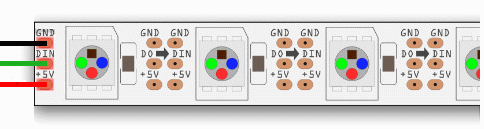
Several NeoPixels are connected in a row as a shift register.
When the first unit receives its three 8 bit numers,
it then copies all subsequent bits to the next unit,
which in turn does in the same way to its next neighbor.
To addres a device in the row,
you must therefore repeat previous data to all the devices prior to the
desired device before you can update the next.
It therefore becomes natural to update all devices in a row.
To prevent data distortion after being copied by many devices, each device tries to correct the timing of the bits it transmits.
/*
   NeoPixel bit timing information. Processor f_clk = 16 MHz T = 62,5 ns.
         ______
   "0": |      |______________...     T0H (400 ns) 07 Cycles, T0L (900 ns) 15 Cycles
         ______________
   "1": |              |_________...  T1H (900 ns) 15 Cycles, T1L (600 ns) 10 Cycles

   TLD < 5000 ns accepted as interbit gap
   TLL > 6000 ns, 6 us to reset and latch

           NeoPixel 12 chain
            _____1____     _____2____         ____12____
           |          |   |          |       |          |
    GND ---| GND  GND |---| GND  GND |- ... -| GND  GND |-
D06->-470R-| >DIN >DO |->-| >DIN >DO |- ... -| >DIN >DO |-
POWER +5V -| +5V  +5V |---| +5V  +5V |- ... -| +5V  +5V |-
C 1000uF   |__________|   |__________|       |__________|

*/
The most critical time from the timing information above is T0H 400 ns. The Arduino UNO Processor has a clock frequency of 16 MHz and the processor only has time to execute 7 instructions in this short time. It is risky to try to program such a short and precise "time" directly with the C language. The C compiler optimizes the code, it is free to delete "unnecessary" instructions, as well as to change the order of the instructions. It is therefore not possible to guarantee neopixel timing with C instructions.
It is absolutely not possible to use the inbuilt features of the Arduino environment digitalWrite(pin, HIGH) and digitalWrite(pin, LOW). Those features takes at least twice as long time as the abowe critical delays! (They perform a plausibility check of the supplied parameters, and this take the extra time).
The NeoPixel bit timing should therefore be written in assembler - that is, directly with the processor's own instructions.
You can write assembler code inside C programs using the asm() directive.
We need to use three different assembler instructions sbi port, bit
(set bit),
cbi port, bi (clear bit) and nop (no operation.
(If interrupt is used, this needs to be "switched off" during bit timing,
and then to be "switched on" again,
it then requires two more assembler instructions,
cli and
sei ).
The assembler program becomes very simple. None of these operations affect any of the processor registers, otherwise this would have had to be taken into account as it could have side effects on the rest of the C program.
The assembler function sendBit() is used to send one bit. (Here somewhat abbreviated, it actually contains a total of 42 nop!)
inline void sendBit( unsigned char bitVal )
{
    if (  bitVal != 0 )    // bit is 1
      {
          asm volatile
            (
              "sbi %[port], %[bitnr] \n\t"   // output bit set port
              "nop \n\t"                     // T1H +13 NOP total 900 ns
               - - - -    11 more nop's here
              "nop \n\t"
              "cbi %[port], %[bitnr] \n\t"   // output bit Clear port
              "nop \n\t"                     // T1L +8 NOP total 600 ns
               - - - -    6 more nop's here
              "nop \n\t"
              : :
              [port]    "I" (_SFR_IO_ADDR(NEOPIXEL_PORT )),
              [bitnr]   "I" (NEOPIXEL_pin)
           );
      }

    else                  // bit is 0
      {
         asm volatile
           (
              "sbi %[port], %[bitnr] \n\t"   // output bit set port
              "nop \n\t"                     // T0H +4 NOP total 400 ns - this is critical
              - - - -    2 more nop's here
              "nop \n\t"
              "cbi %[port], %[bitnr] \n\t"   // output bit clear port
              "nop \n\t"                     // T0L +13 NOP total 900 ns
              - - - -    11 more nop's here
              "nop \n\t"
              : :
              [port]    "I" (_SFR_IO_ADDR(NEOPIXEL_PORT )),
              [bitnr]   "I" (NEOPIXEL_pin)
           );
      }
}
(Information about the inline assembler for AVR can be obtained here: Inline Assembler.)
An array ClockFace[PIXELS * 3] is used to store data for all pixels at three Bytes per pixel. When any pixel needs updating, it is reasonable to send out the data for all the pixels from this array.
NeoPixel's three colors can be mixed into countless shades.
There is a lot of information about this on the web,
but to simplify the use here, we define a simple palette with 12 colors to use in the program.
The color values can have a maximum value of 255,
but to limit power consumption, in the program we are restricting us to a maximum of 25.
| GREEN 0 | CHARTREUSE 1 | YELLOW 2 | ORANGE 3 | RED 4 | ROSE 5 |
|---|---|---|---|---|---|
| MAGENTA 6 | VIOLET 7 | BLUE 8 | AZURE 9 | CYAN 10 | SPRING 11 |
With the function setPixelPalettColor() you can enter color information from the palett to the aray ClockFace[].
The function sendPixel() sends data for one pixel from the array ClockFace[],
it uses the function sendBit() for the time-critical neopixel timing.
Loop to send all pixel data:
// send all pixels in the "ClockFace" array
for(i = 0; i < 12 ; i++ ) sendPixel( ClockFace + i*3 );
_delay_us (6);  // long delay to trigger all the pixels to latch (the reset timeout)
A Clock Face program can use different colors for hour, minute and second. Every five seconds you update the ring with the 12 NeoPixel pixels to light up the corresponding Clock Face pixels. Exact time can be retrieved from a RTC module. In that case, see the example about the TWI-unit.
This sample program only updates the ring by lighting one new pixel every five seconds (this to leave room for more self-experimentation).
 neopixel_seconds.txt
(for Arduino store code as: neopixel_seconds\neopixel_seconds.ino)
neopixel_seconds.txt
(for Arduino store code as: neopixel_seconds\neopixel_seconds.ino)( Or perhaps something like this? neopixel_clock.txt )
William Sandqvist willsandqvist@gmail.com
