The VoxelFarm engine is a collection of classes, functions and structures for realtime procedural generation and voxel manipulation.
There are two main use cases for the engine:
(1) A viewer explores a virtual world that is generated on the fly in the viewer's machine
(2) A set of dedicated machines pre-generates content that will be sent to viewers later
From the generation point of view, the second case is a subset of the first case as it deals with producing content for sections of the world, which is something also necessary for the first case. For that reason, this document will concentrate only on the first case and it will be assumed the pre-generation scenario can be always derived from it.
The virtual world is considered fully 3D. An imaginary grid is assumed to divide the world into equally sized 3D cells. Each cell measures CELL_SIZE (defined in mapindex.h) units along each direction. The application using the engine can choose any value for CELL_SIZE that suits its goals.
From a given 3D point it is possible to determine the coordinates of the cell containing the point. This is simply done by dividing each coordinate by CELL_SIZE and keeping the integer part. Each cell can be uniquely described by its integer coordinates in this grid. This grid is known as LOD zero because these are the smallest cells possible.
The engine then assumes the existence an array of additional grids, each one having cells with dimensions twice the size of the previous grid. These are known as the LOD 1..N cells.
Since the grids are aligned, it can be assumed that one cell at LOD(N) will contain eight cells at LOD(N-1).
Any cell, no matter on which LOD grid, can be uniquely described by four coordinates:
These four coordinates can be packed into a single 64bit identifier. The application using the engine can choose different bit allotments depending on the space properties they need to represent.
By default the key design is:

This design uses half the resolution for the Y coordinate. This suits flat/toroidal worlds like the ones found in most games.
This is how to compute the world size limit imposed by any key design:

Assuming a CELL_SIZE of 20 meters, the default key design can represent a world that is 335,544 Km x 335,544 Km in the horizontal and 82 Km in the vertical.
Note planet Earth is 40,000 Km along the equator and 20 Km from lowest to highest point.
The LOD coordinate can be expressed with only 4 bits. The reason behind this is LOD coordinates are used only for displaying. 4 bits allow 16 LOD. The size of a LOD15 cell can be computed as:

A single cell in LOD15 would measure 655 Km. It would be so large that it would not be practical for it to appear on screen as the view never goes more than a dozen kilometers into the horizon.
The engine includes two functions to conveniently pack and unpack cell coordinates out of its unique ID: packCellId() and unpackCellId() in mapindex.h
The world is broken down into uniquely identifiable cells. Hence, producing any depiction of the virtual world translates into finding which cells need to be computed and displayed.
A typical use for this engine is a virtual world that is experienced at eye level. The engine provides means to compute a list of cells for this case (scene.h).
The cells are laid out as concentric rings around the viewer's position. Each subsequent ring will use higher LOD cells. As each LOD is twice the length of its predecessor, it is possible to cover large distances to the horizon with a limited number of cells.
The following image shows this arrangement:
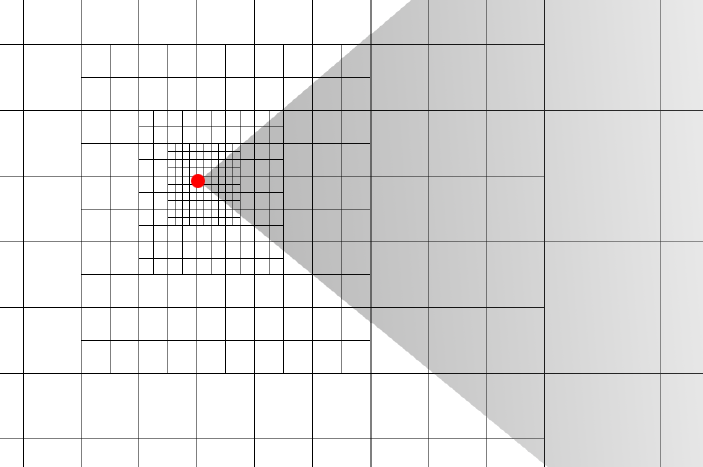
This structure is also known as a geometry clipmap.
Rendering the contents of each cell on screen would display the entire world. This is how rendering is usually done.
As the viewer moves, new sets of cells can be computed. It is possible to compute which cells were removed from the previous scene and which cells are actually new. A continuous flow of scenes creates the illusion of a coherent world having features that becomes more detailed as the viewer approaches them.
The engine uses voxels to represent and combine different layers of world data. Voxel representations exist only in memory as the display of the world is produced by traditional polygons.
A typical application where the user moves at eye-level contains the following pipeline:
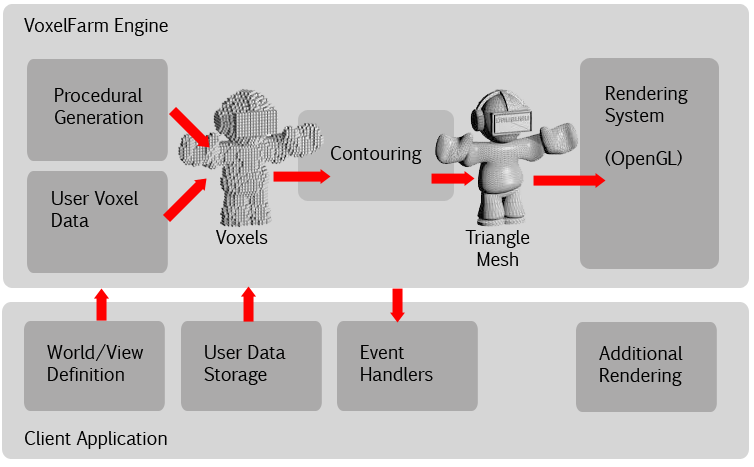
This works as follows:
The engine first evaluates the procedural generation functions. These functions produce voxel data. The resulting voxels are mixed with voxels that may have been defined by the user, as the application may allow some form of voxel edition.
The final voxel data is fed to a contouring process. This process creates polygonal meshes out of the voxel data. These meshes can be used for rendering in traditional graphics pipelines like the ones in game engines, also used for collision detection, AI, etc.
There are different systems that can produce voxel data, for instance:
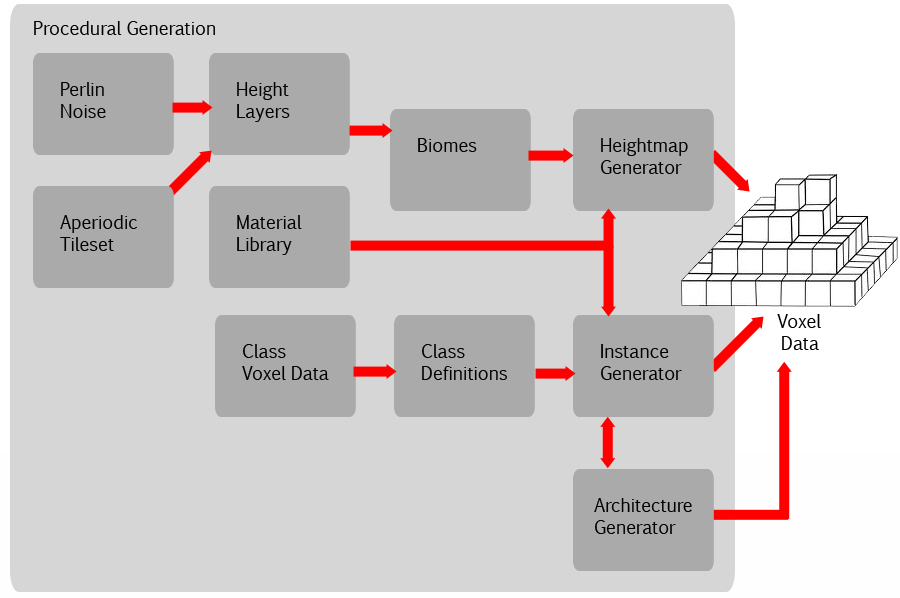
The engine uses a form of abstraction around them. Each one of these different layers implements a common interface: IVoxelLayer (VoxelLayer.h). All these layers can be inserted into a single generator object (Generator.h) which then is used by the engine to generate the voxel data.
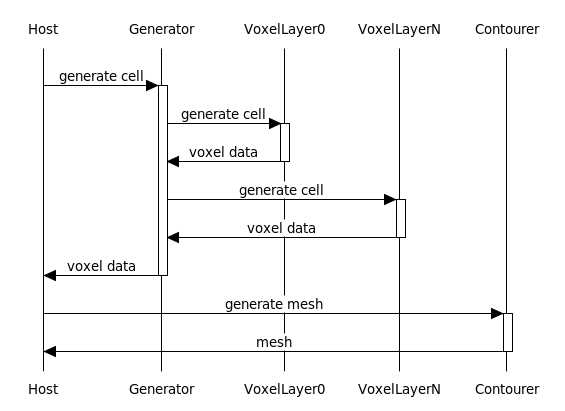
The following sequence diagram illustrates this process:
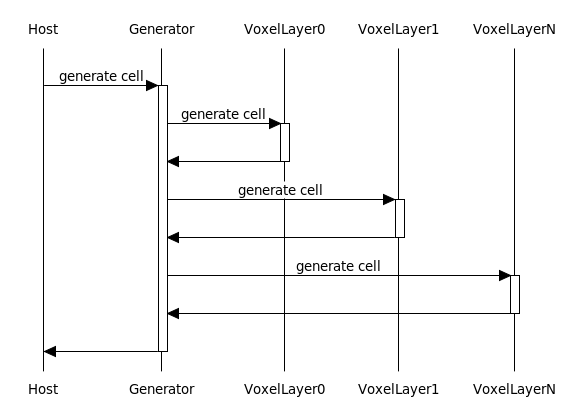
To add a new source of data to the world one must simple create a new implementation of IVoxelLayer and the engine will be able to incorporate its output regardless of how it is produced.
The IVoxelLayer is asked to fill a buffer with the voxel data. The buffer represents the contents of a cell as defined by its unique 64bit ID.
A cell's voxel data is kept in a regular 3D grid, where each point in the grid contains a single voxel. The VoxelData template is a generic representation of this data. Each voxel in the buffer can be accesed by constructing VoxelData::Index pointer from the x, y and z coordinates of the voxels within the array. Using the index it is possible to read individual voxel attributes like material, vector, etc.
The main voxel attributes are: a 16 bit material identifier and three 8 bit coordinates (the voxel vector), which represent a point within the voxel. This point is known to be in the surface of the volume the voxel data intends to represent. A single coordinate ranges from 0 to 255, where 0 is the origin of the voxel and 255 is the origin of the neighboring voxel. An extension to the vector system called VECTOR_OVERFLOW (or roaming vectors) allows to extend the reach of voxel vectors so sharper features can be encoded with the same number of bits.
There are two main types of VoxelData buffers in use. The first is ContourVoxelData. This buffer is used during generation and contouring. It spans over a single cell, but provides additional margins (BLOCK_MARGIN) that extend into the neighboring cells. This is so there is enough information for computing inter-cell seams later. The second buffer is BlockVoxelData. This is used to store voxels for a given cell.
The voxel buffer for a cell can be passed to the contouring functions (contour.h) to produce a polygonal mesh as shown by the following sequence:
The default terrain generation in the engine is one particular case of a IVoxelLayer implementation which is contained in the CHeightmapTerrain class.
Several other classes are involved in the terrain generation, they are contained in TileSet.h and Biome.h:
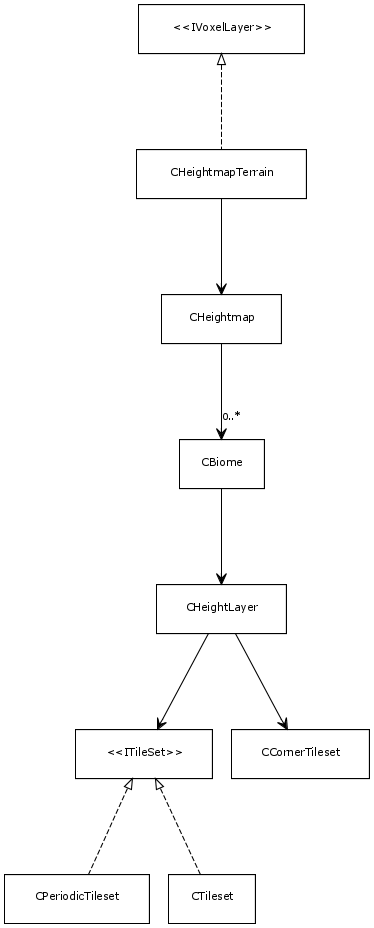
This is structured as follows: The CTerrainHeightmap object does the actual voxel generation for the terrain. It is linked to a CHeightmap object.
The CHeightmap object has a series of different CBiome instances. Each represents a different biome. Biomes have very distinct properties, including how the terrain elevation is defined. For instance the mountain ranges found in a desertic zone will be different to the ones in a jungle. The biome links to a CHeightLayer object which determines the height of the terrain at any point where the biome is predominant.
The CHeightLayer object computes heights as the result on two different components: a base noise for very large, low frequency features, and a ITileSet implementation for finer more detailed terrain features. It also uses a CCornerTileset object, which is a different flavor of aperiodic tiling to generate cave patterns underground.
The ITileSet interface allows to sample both aperiodic tilesets (Wang Tiles) and periodic sets, which are traditional repeating maps.
The following sequence shows the essence of how terrain voxels are produced:
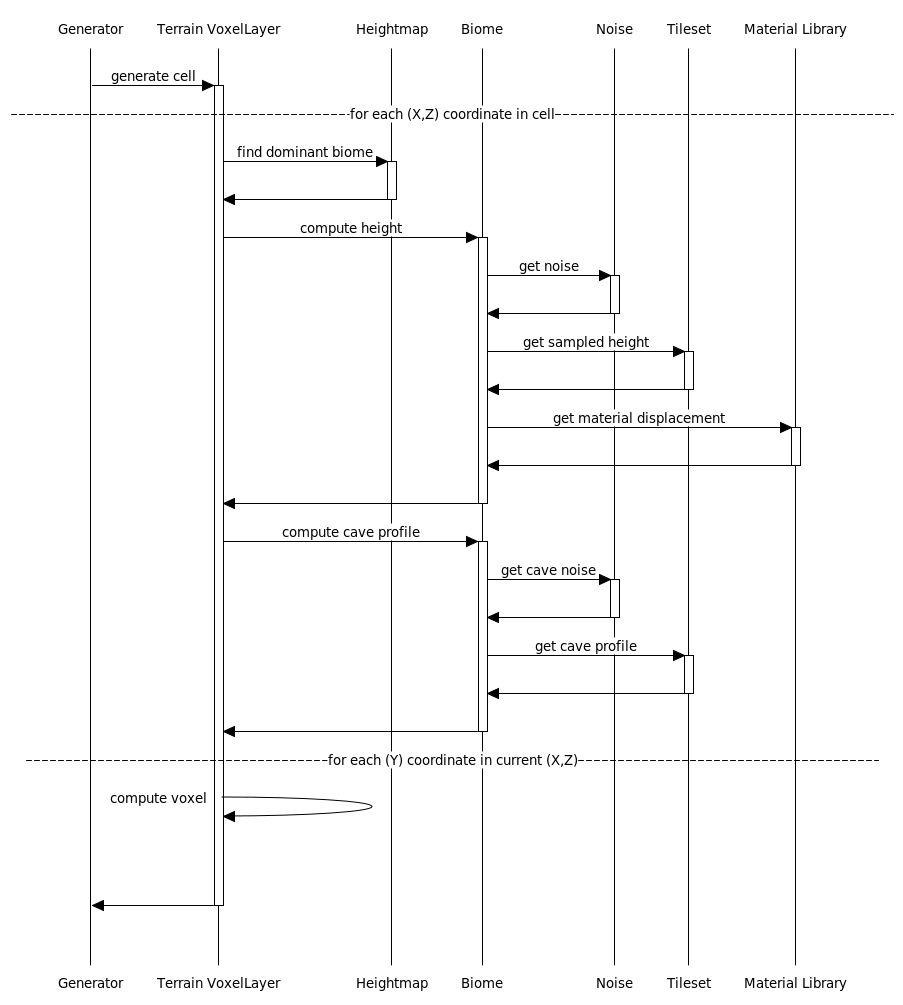
The sequence begins when the generator calls the getCountourData() method from the IVoxelLayer to the CHeightmapTerrain object. This is a request to generate the voxel data for the specified cell.
The CHeightmapTerrain iterates over each (X,Z) point in the cell doing the following:
A typical use for the engine is a viewer that moves around the world and experiences it from an eye-level perspective. This is suitable for first person views or third person views where a camera closely follows the user's avatar.
This case involves generating a series of scenes as the viewer moves. The current scene must be replaced by a new scene centered closer to the new position of the camera. This requires discovering which cells came into sight and computing their mesh representation in a timely fashion so steady camera movement is possible.
The engine includes one object that is able to perform that: CClipmapView (ClipmapView.h). It keeps track of the current position of a viewer and builds queues of cells required to be generated and converted to mesh. Then it keeps a cache of cells that have been already generated to avoid creating them again.
The following class diagram shows all the objects involved in the functioning of the CClipmapView:
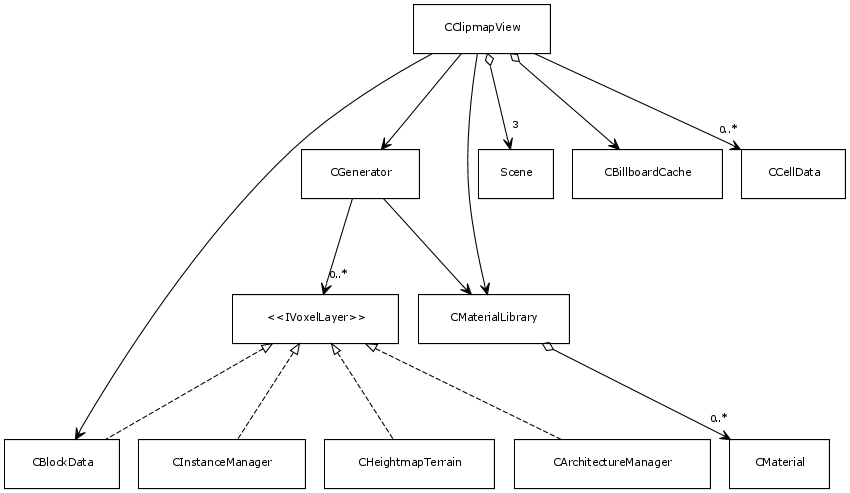
Here is a brief description of what they are and what they do:
The CClipmapView object has two main methods: sceneLoop() and contourLoop().
The sceneLoop() method should be called by the host application whenever it desires the CClipmapView to discover the need for a new scene. If a new scene is required, the function queues the cells that require geneneration.
The contourLoop() method processes some of the queued cells. This includes generating the voxel data for the cell and then performing a contour operation to extract a polygonal mesh. Once a mesh is produced for a given cell, it is stored on a new queue for the last stage of the process which is called "baking".
The host is responsible to call the contourLoop() method whenever it wants cells to be processed. Since this is the most time-consuming task in the engine, it is usually invoked by multiple worker threads.
The host is then responsible for pulling cell meshes from the bake queue by calling the getNextCellToBake() function. This is so any application-specific processing can be applied to the mesh. For instance, an application that uses an OpenGL renderer may want to create vertex buffer objects at this point. Once a mesh is baked, the host should notify it to the CClipmapView object notifyCellBaked() so the CClipmapView knows the cell is ready for use.
The following sequence diagram illustrates this process:
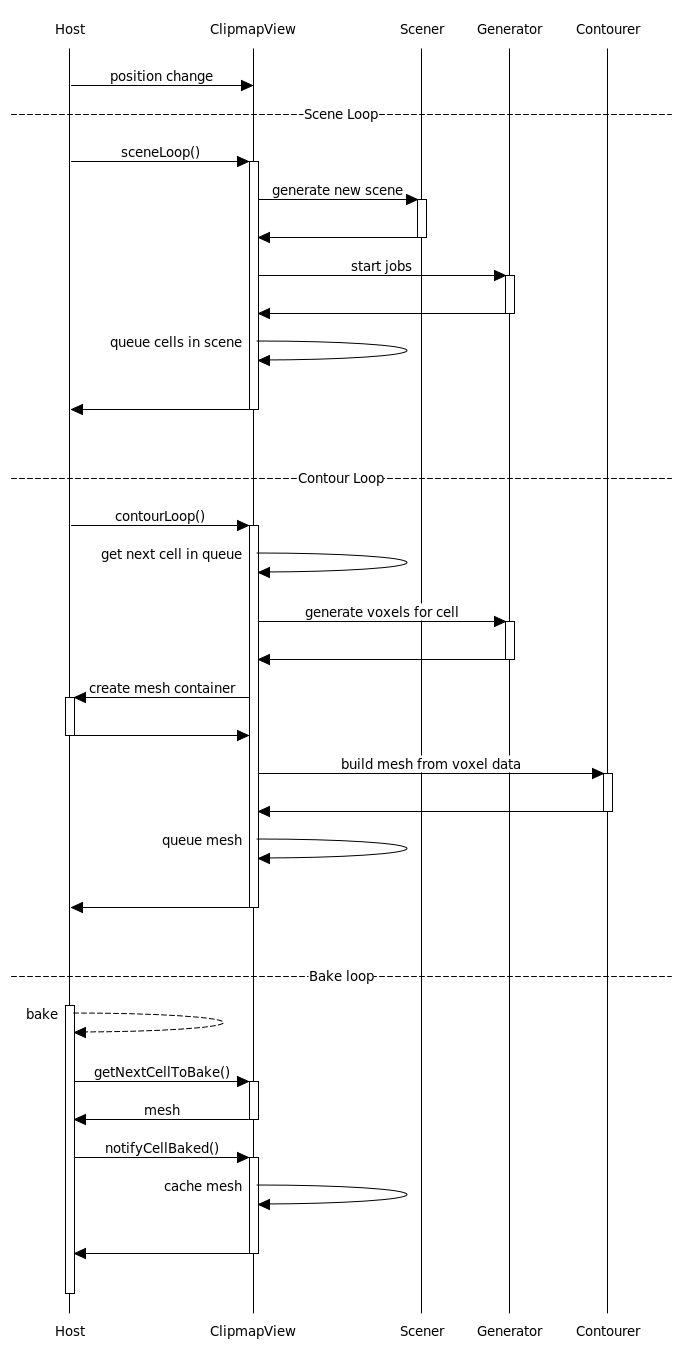
Here is a description of the steps involved in the diagram:
Then to make sure the CClipmap transitions from one scene to the next, the application must call the CClipmapView::sceneFade() method.
And whenever the application decides it is time to reclaim some of the memory used by cached mesh objects it should call CClipmapView::garbageCollect().
The CClipmapView also allows to change voxels. The changes are stored in a CBlockData instance that is associated to the CClipmapView. This object also implements the IVoxelLayer interface and is referenced by the CGenerator object. This is how the user voxels make it to the final voxel output for the world.
The application can set the current line of sight to the CClipmapView instance by invoking the setLineOfSight() method. This causes the edition cursor properties to be recomputed, which is mostly the location where any changes will be introduced.
Then the application may calls methods into the CClipmapView that actually change the voxels based on this location. The methods are:
The following sequence diagram shows the steps taking place during edition operations:
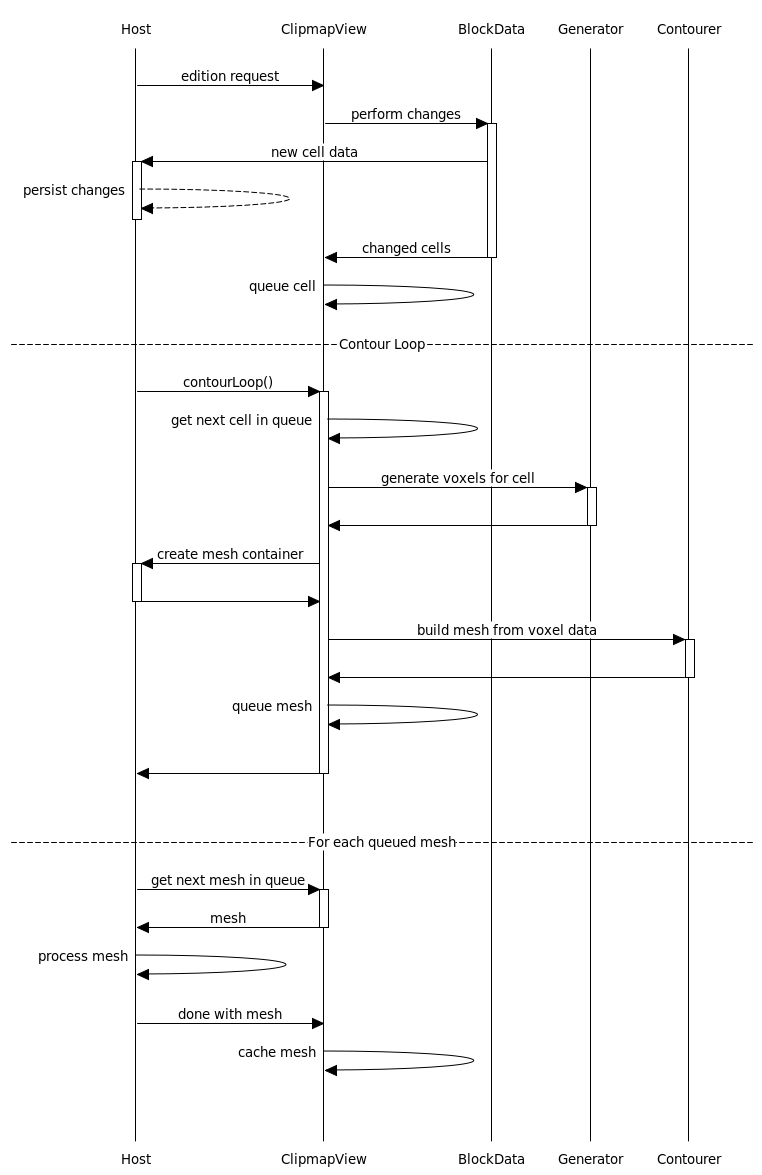
The steps are:
From this point on, the sequence is the same as when the viewer moves.
The main output of the VoxelFarm engine is polygonal meshes. The engine generates a different mesh for each cell it processes. A mesh is represented by a CCellData object (CellData.h)
A single CCellData object may contain more than one mesh. This is the concept of "medium". Currently there are two mediums: one for solid world geometry and another for foliage. In the future new mediums may be added, for instance water or glass. All polygons belonging to the same medium are stored together. This is so the rendering of the cell for a given medium can be batched into a single draw call.
For each medium the CCellData object contains a high level representation of the mesh data. This is kept as an object of type CFastQuadrics (FastQuadrics.h). This object allows to quickly navigate over the mesh connectivity information. For instance, it can be used to quickly traverse through all the triangles sharing one vertex. This information is used by the engine's OpenGL renderer to create indexed face lists also to optimize the usage of the GPU's vertex cache.
The CCellData object also contains additional flat lists for all the triangles in each medium. The following properties are kept for each triangle:
A soon as the CCellData is "baked" by the host application, these buffers could be removed from the engine's memory by invoking CCellData::releaseData()
 1.8.9.1
